
Digital displays in airports, rail stations, bus terminals and other transportation hubs are relied on to deliver clear, timely information while fitting complex architectural, security and technical requirements.
PIDS (Passenger Information Display Systems) automatically update arrival/departure times, gate changes, and delay notifications by linking directly with the hub's central data feed or API.
"Airports are leading this transformation, but rail, metro, and intermodal terminals are quickly catching up. As competition among hubs intensifies, the traveler experience is becoming a strategic differentiator, and displays are playing a central role.” [Metro Magazine]
When specifying a transit display, consultants are considering not only the application, but also the viewing distance, brightness, screen size, aspect ratio, mounting, touch requirements, operating system, connectivity, environmental conditions, service access and expected technology lifecycle. It can seem like a daunting task to check all the boxes, however, with a little more knowledge about what is available meeting facility demands and traveler needs it achievable.
Let’s break down how companies with a strong partner network, like Bluefin, help transit organizations and their consultants coordinate these requirements through purpose-built commercial displays, integrated system-on-chip technology and Core, Tailored and Custom project paths.
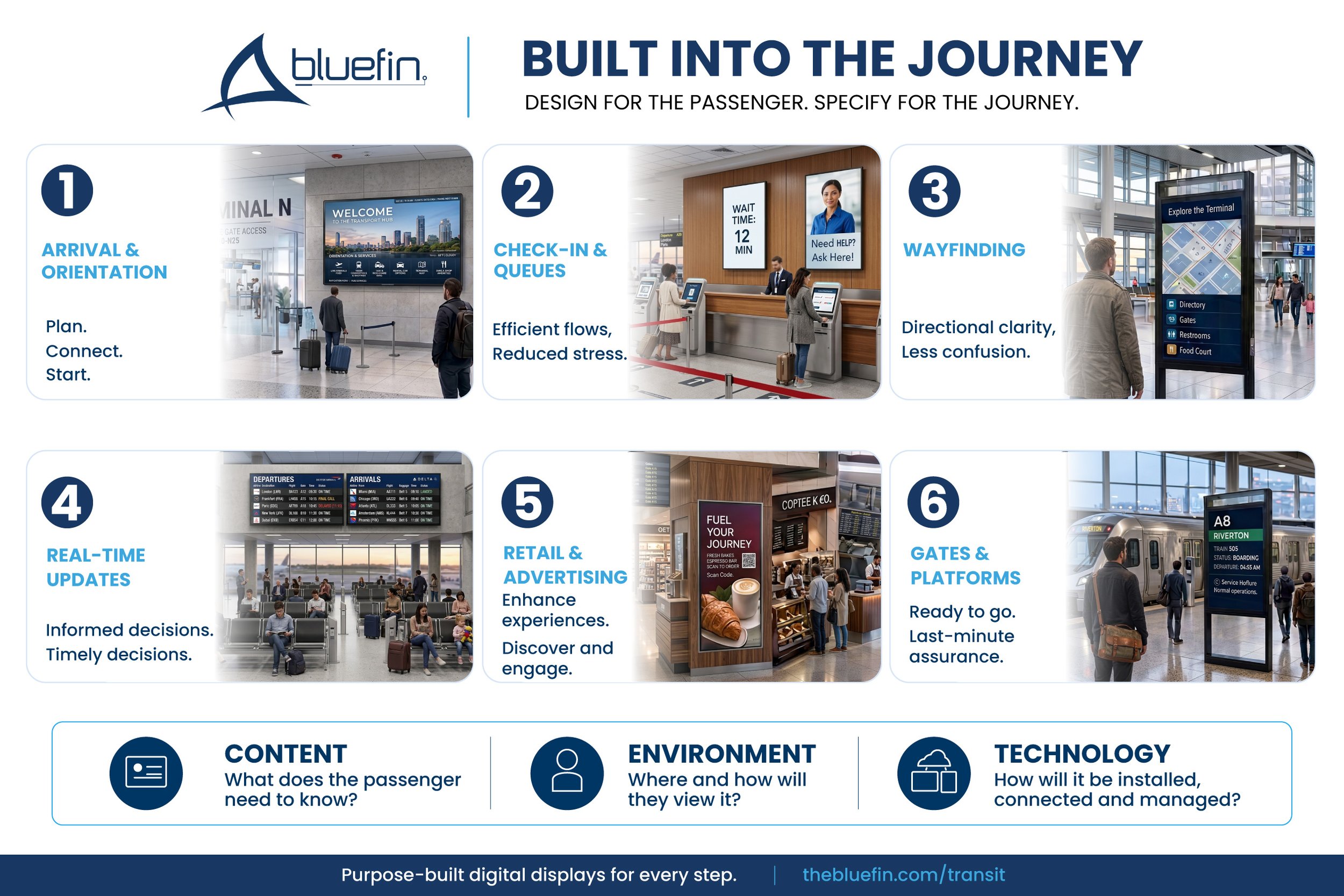
Applications: What are digital displays used for in transit environments?
Transit digital displays help passengers find their way, receive real-time travel updates, manage wait times and respond to service disruptions. They can also provide interactive information and support advertising or concession programs.
The six primary applications are:
Wayfinding
Real-time arrival and departure information
Interactive information points
Queue and line management
Emergency and disruption messaging
Advertising and concession promotions
A connected display strategy allows these applications to work together throughout the passenger journey.
93% of passengers want real-time flight information readily available
76% expect intuitive digital wayfinding
"Digital signage has become the nervous system of our airport. From flight information to wayfinding to emergency communications, every passenger touchpoint is now connected and intelligent. We've seen missed flight incidents drop 34%, retail spending increase 28%, and our passenger satisfaction scores reach all-time highs. This is what modern air travel should feel like."— Catherine Reynolds, Director of Passenger Experience, Regional International Airport
How do digital displays improve transit wayfinding?
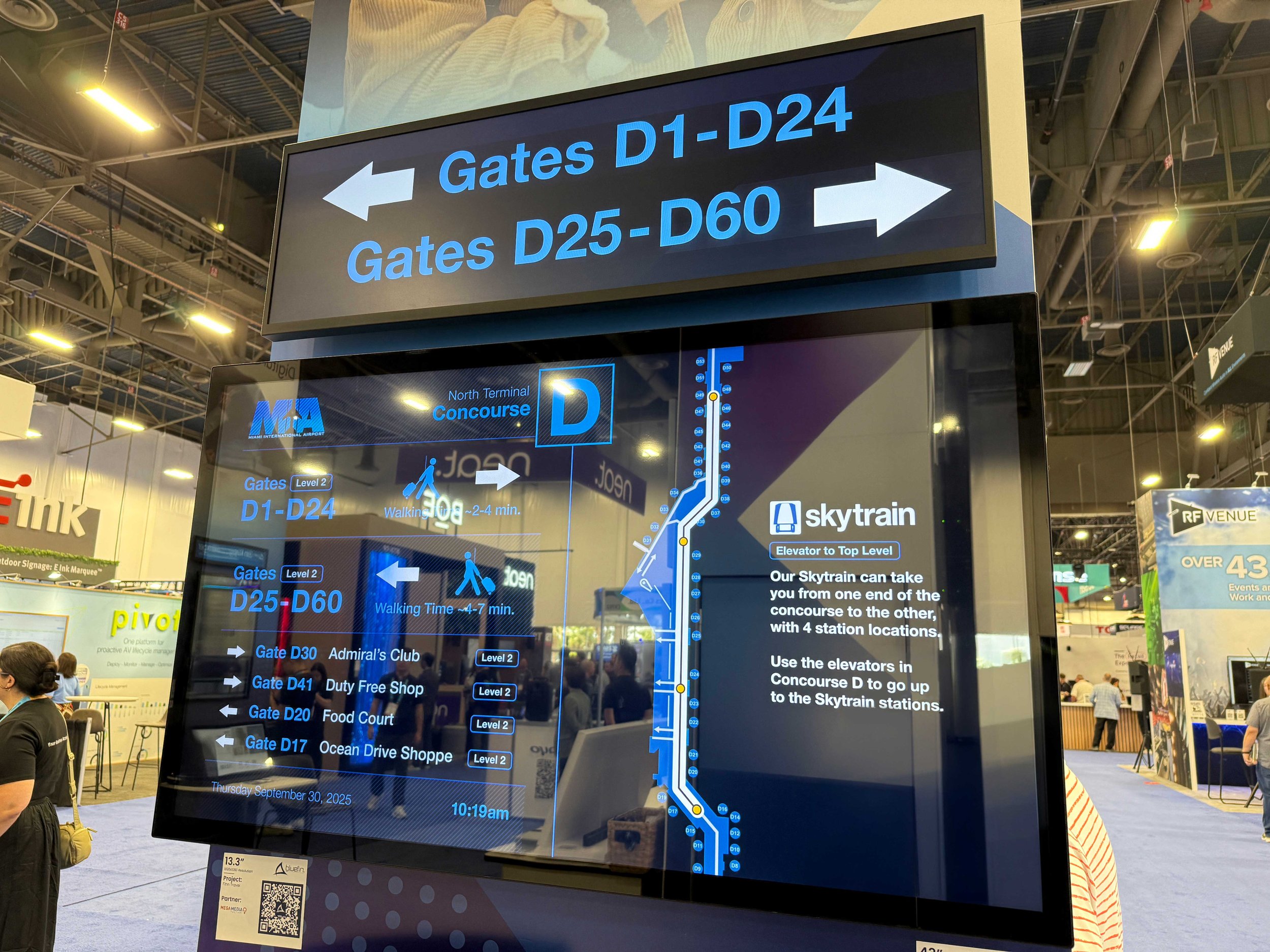
Digital wayfinding displays help passengers navigate terminals, gates, platforms, transfers, amenities and ground transportation.
Interactive touchscreens can provide searchable maps, directories and accessible-route information. Non-interactive displays can communicate clear directional content at entrances, decision points and high-traffic intersections.
When the display format matches the location and content there is a 35% reduction in confusion and stress for travelers. A large portrait display works well for a terminal directory providing maximum visibility, while an ultrawide display can fit above a corridor, ticket counter or platform entrance.
Effective digital wayfinding clarifies the path to the gate, which increases post-security retail "dwell time" by 24%. Once travelers feel secure about their schedule, they are far more likely to shop and dine.
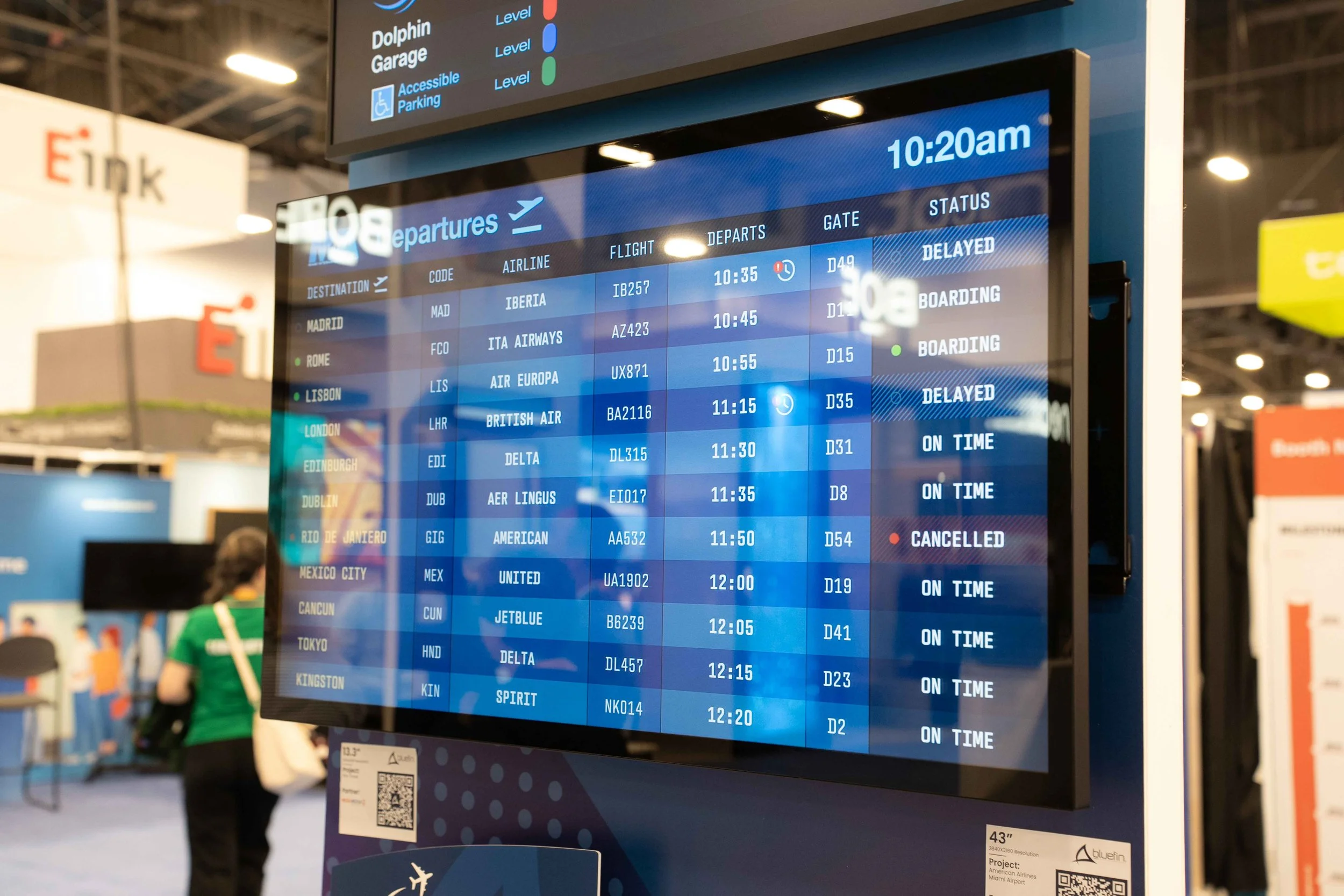
How are displays used for real-time transit information?
Transit displays can present arrivals, departures, delays, gate changes, service interruptions and connection information.
Designers and integrators are looking for screens that provide:
Clear visibility at the intended viewing distance
Appropriate brightness for the lighting conditions
Reliable network connectivity
Compatibility with the selected content platform
Commercial-grade performance for continuous operation
A layout that allows passengers to understand changes quickly
Real-time information is only valuable when passengers can see, understand and trust it. Choosing the optimal display hardware an the onset of a project means less headaches or worse, replacement costs, down the road.
Choosing a digital display: What should consultants consider when specifying a transit display?
Consultants are expected to evaluate the complete operating environment—not just the diagonal screen size.
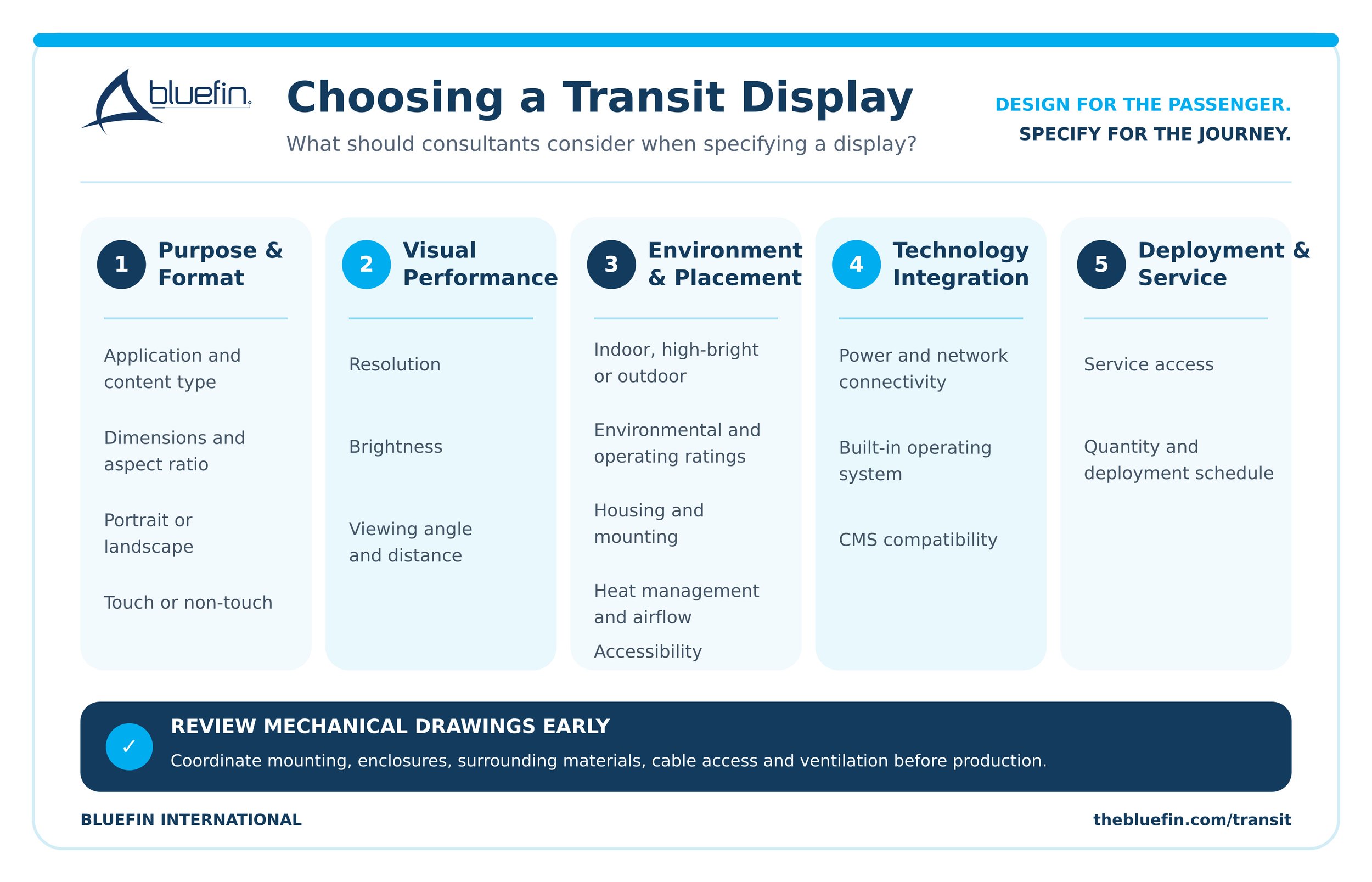
When in the design process should displays be considered?
Bringing the display manufacturer into the project early helps the design team identify technical conflicts before the environment or fixture is finalized.
Early collaboration can address:
Whether a standard screen fits the available space
How the display will be mounted
How technicians will access it
Where power and data connections will be located
Whether the enclosure allows sufficient airflow
Whether the screen is bright enough for the environment
Which operating system supports the content
Whether touch, glass or other accessories are required
A display can meet its individual technical specifications and still be wrong for the installation. The screen must also fit the architecture, content and passenger interaction.
External player or SoC: What is a system on chip in digital signage?
A system on chip, commonly called an SoC, is a processing platform built directly into the digital display.
A traditional installation may require a display, external media player, separate player mount, additional power connection and multiple cables. A display with an embedded SoC combines the display and playback hardware into one unit.
For transit installations, a built-in SoC can provide:
Fewer separate components
Reduced cabling
Cleaner installations
Fewer mounting requirements
More predictable kiosk and enclosure designs
Consistent endpoint configurations
Easier access and service planning
The software platform and content management system determine the specific remote publishing, monitoring and update capabilities.
Selecting an OS: What is Bluefin Flex-OS?
Bluefin Flex-OS is a commercial display architecture that allows project teams to select the built-in processing platform that fits their content strategy and IT environment.
Available platform options include:
Bluefin Intel Ocean for Windows, Linux or ChromeOS Flex
External media players through HDMI
This allows consultants to coordinate the display, operating system and content requirements as one solution.
Can a Flex-OS display use an external media player?
Yes. Flex-OS displays retain HDMI connectivity, allowing an external media player to be connected when required.
This gives transit operators flexibility if software, security or processing requirements change. Instead of automatically replacing the complete display, the organization may be able to transition to an external source.
Built-in today. Flexible for tomorrow.
The content! How are transit displays updated and managed?
Content and device management depend on the operating system and CMS selected for the project.
With a compatible platform, authorized teams are able to:
Publish content remotely
Update arrival and departure information
Schedule advertising
Distribute disruption messaging
Monitor endpoint status
Manage software or firmware updates
Maintain content across multiple facilities
The display provides the hardware endpoint. The selected operating system, CMS, network configuration and integration determine how the complete system is managed.
What display formats are available for transit projects?
Bluefin offers displays across three project paths.
Core displays
Core displays are established models and configurations for applications where an appropriate display already exists.
Tailored displays
Tailored displays begin with a proven Bluefin platform and modify elements such as size, housing, glass, color, touch, brightness or operating system.
Custom displays
Custom displays are engineered around applications requiring original dimensions, specialized construction or ground-up product development.

Bluefin digital display form factors. In stock ATL
Available formats include:
Traditional 16:9 displays
Portrait displays
Summary: What to ask to choose the right transit display?
Begin with the passenger need and installation environment before choosing the hardware.
Ask:
What information will the display communicate?
Where will passengers encounter it?
How far away will they be?
Will they interact with the screen?
How frequently will the information change?
What software will deliver the content?
What are the lighting and environmental conditions?
How will the display be mounted, powered and serviced?
How long is the endpoint expected to remain in place?
Is the project best served by a Core, Tailored or Custom display?
The right display should support the content, fit the architecture and remain manageable throughout the life of the facility.
Design for the passenger. Specify for the journey.
Passengers do not experience the architecture, content, hardware, software and installation as separate components. They experience one journey.
Involving Bluefin early helps consultants coordinate display dimensions, form factor, operating system, mounting, brightness, connectivity and environmental requirements before those decisions become difficult or expensive to change.
Explore Bluefin Transit Solutions
Frequently asked questions about transit digital signage:
-
Transit digital signage is a network of commercial displays used to communicate wayfinding, schedules, delays, emergency messages, queue information, advertising and other passenger information.
-
The best display depends on its application, viewing distance, lighting, mounting, content, operating system and environmental conditions. Transit facilities commonly use large-format, portrait, ultrawide, interactive, high-bright and outdoor displays.
-
A built-in SoC integrates the processing platform into the display, reducing external players, mounts, power connections and cabling.
-
Yes, when the displays are paired with a compatible operating system, CMS and network configuration. Capabilities may include remote content publishing, monitoring and software updates.
-
Yes. Bluefin Flex-OS displays include HDMI connectivity, providing flexibility to use an external player when the project requires it.
-
Yes. Bluefin offers Core, Tailored and Custom project paths, including standard configurations, modified displays and ground-up engineering.