
A step-by-step plan to start with one campus need and build toward a connected digital signage network
Quick answer: Colleges and universities can make smart use of remaining year-end budget by starting with one clearly defined communication problem, funding a complete first phase and selecting digital signage hardware and software that can support future expansion. Room scheduling, wayfinding, campus communications, dining and emergency messaging are all practical places to begin.
The end of the year has a way of speeding up decisions. There may be budget left to use, projects that have been sitting on the wish list, and a limited window to turn available funds into something useful for students, faculty and staff.
Digital signage can be a smart place to invest—but that does not mean a university needs to tackle the entire campus at once.
A successful campus signage rollout can begin with one building, one communication challenge or even one type of display. The important part is making the first investment with the larger campus journey in mind. When the hardware, software and installation plan are chosen carefully, the initial project can solve an immediate need while creating a foundation for future growth.
What are the seven steps in a campus digital signage rollout?
Identify the communication need.
Prioritize the locations with the greatest impact.
Define a complete first phase that fits the available budget.
Select hardware that simplifies installation and support.
Establish content ownership and emergency permissions.
Choose technology that can support future expansion.
Measure the results before planning the next phase.
Here is how to put those steps into practice:
Step 1: What campus communication problem needs to be solved?
Before choosing display sizes or mounting locations, identify where information is currently difficult to find, slow to update or too easy to overlook.
Walk through the campus experience from the perspective of a new student, a visitor, a faculty member and the staff responsible for keeping information current. Where do people stop to ask for directions? Which meeting spaces are regularly double-booked? Where are printed notices still being taped to walls? How quickly can urgent information reach the people who need it?
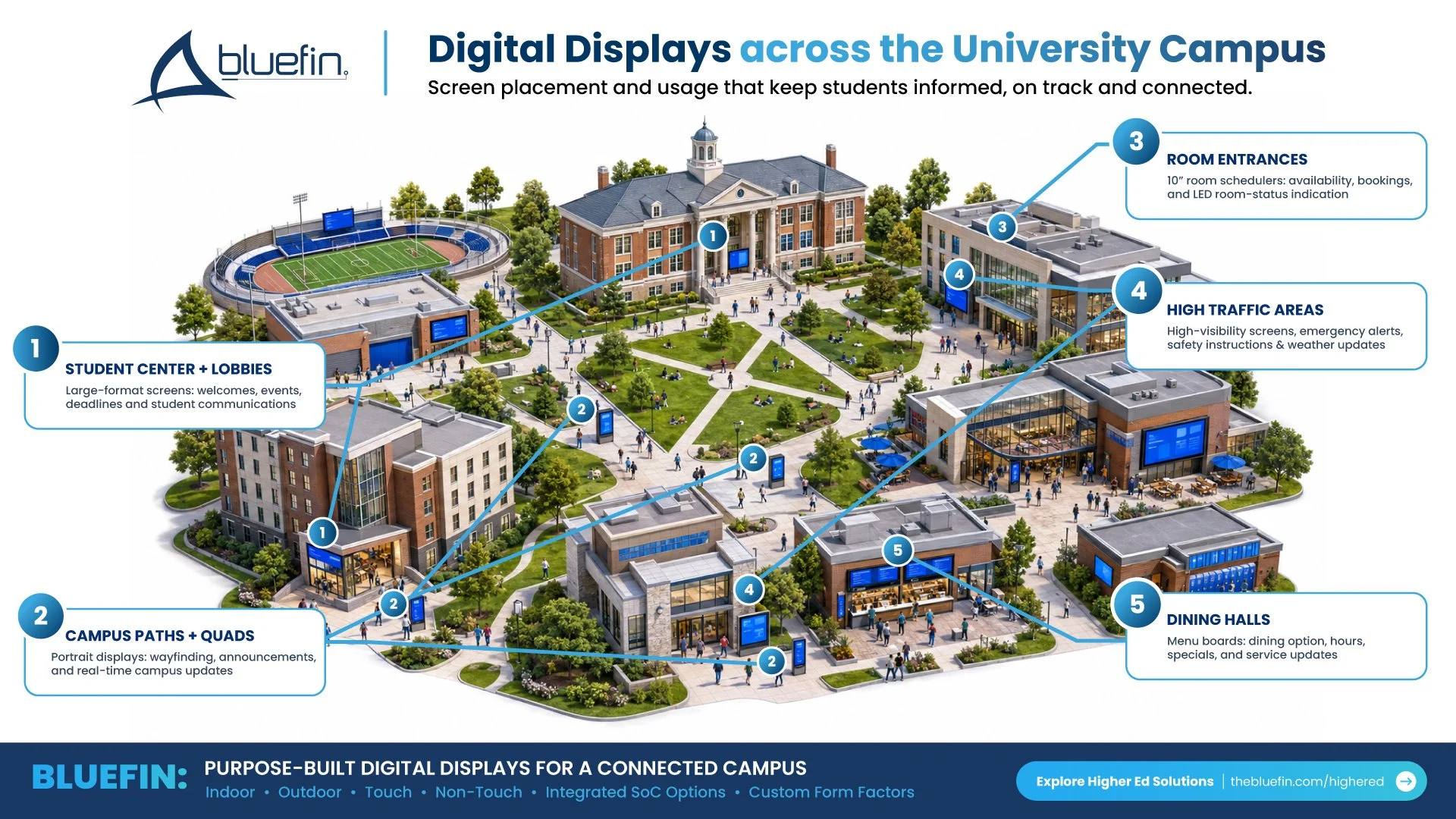
Where can colleges use digital signage?

Common campus digital signage applications include:
Room scheduling: Display availability outside classrooms, conference rooms and collaborative spaces.
Wayfinding: Help students and visitors navigate student centers, academic buildings and large campus complexes.
Campus communications: Share events, deadlines and announcements in residence halls, libraries and common areas.
Dining: Update menus, pricing, nutritional information and service notices in dining facilities and cafés.
Emergency messaging: Extend urgent alerts across displays in high-traffic or strategically important locations.
Athletics and events: Support fan, donor, staff and event communications in stadiums, arenas and locker-room facilities.
Choosing one clearly defined problem makes it easier to establish scope, demonstrate value and move a project forward before remaining funds expire.
Step 2: Where will digital displays have the greatest impact?
Once the need is clear, identify where a display will be most useful. A screen only works when it is placed where the intended audience naturally needs the information.
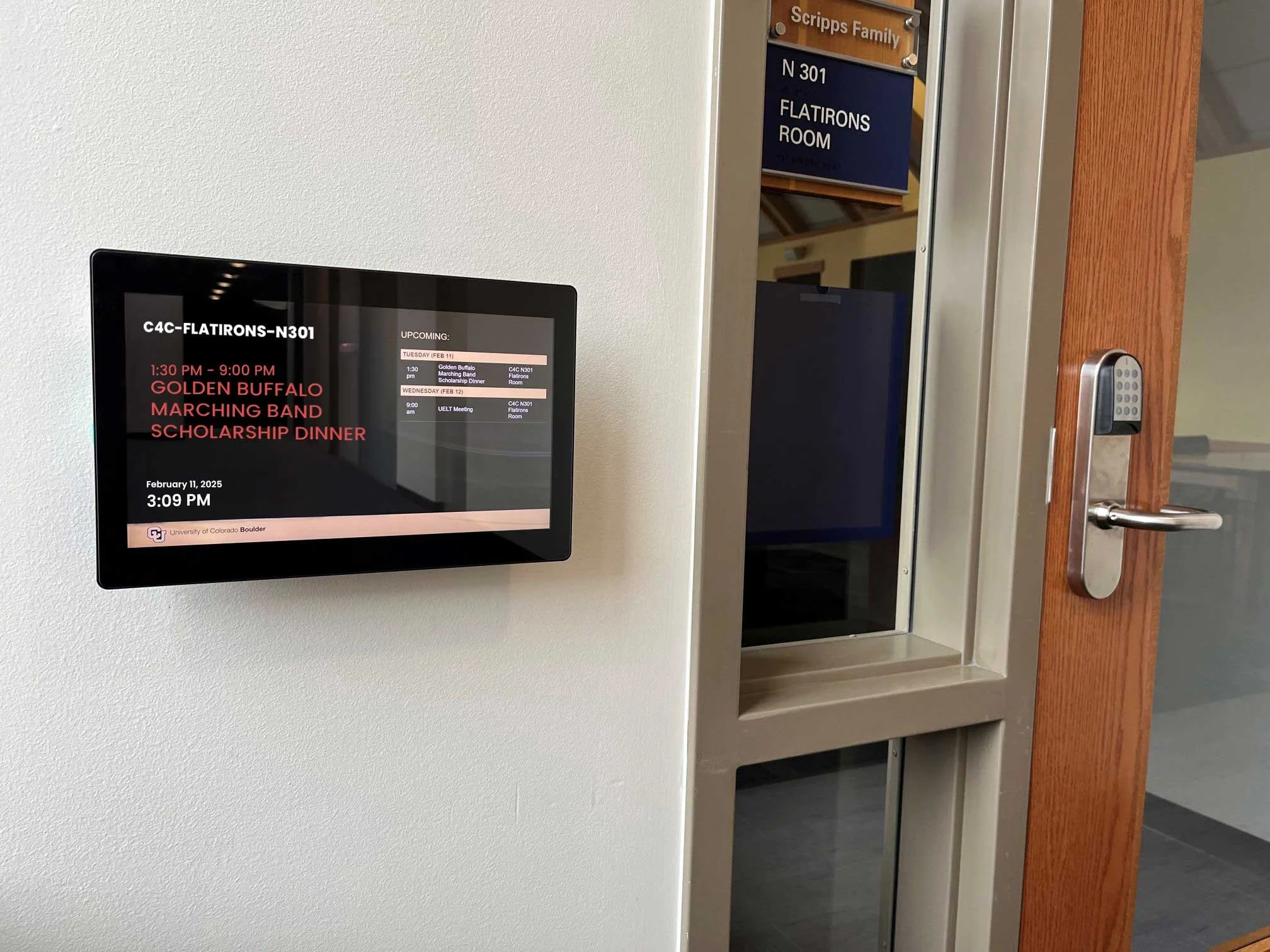
University of Colorado Boulder partnered with REACH Media
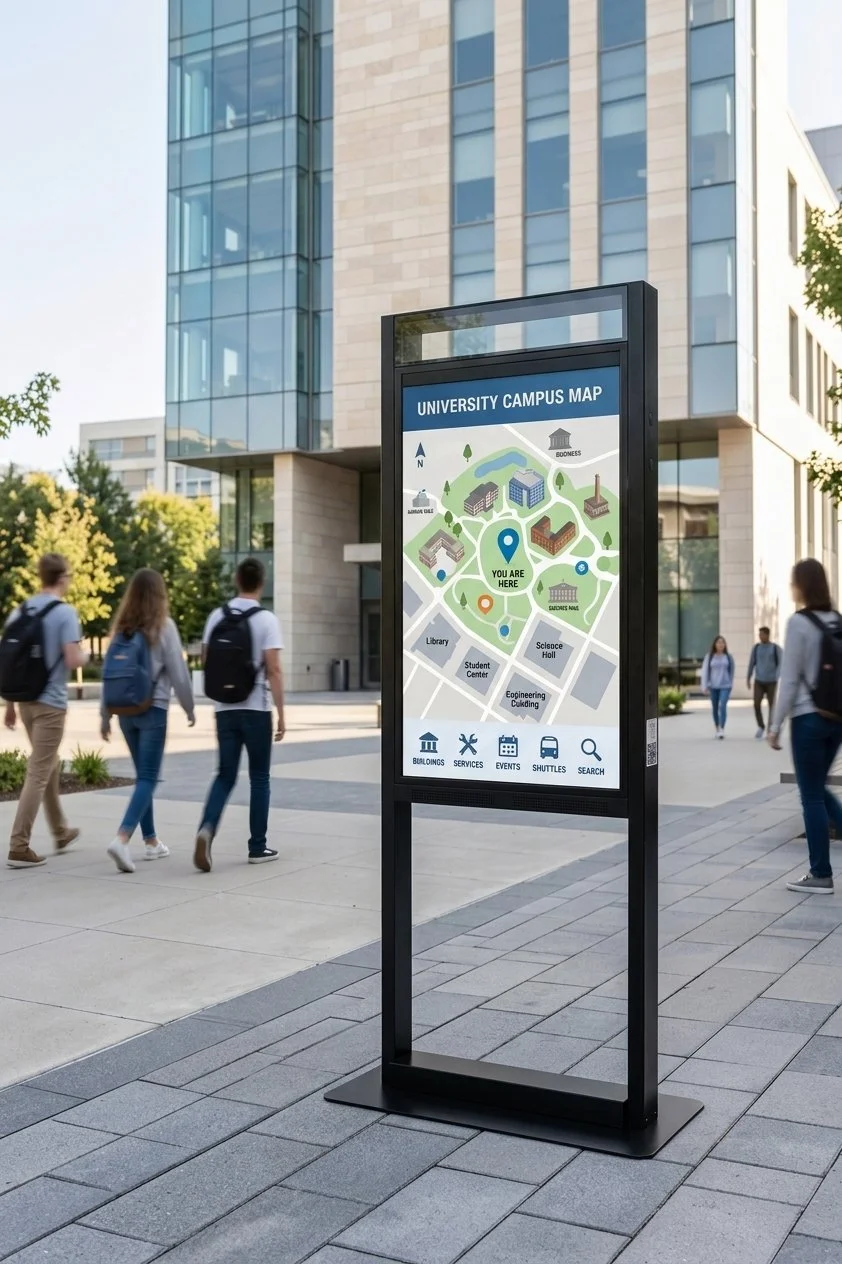
A compact room scheduler may be the right fit outside a classroom. A portrait display may work better for a directory in a narrow lobby. A countertop touchscreen can support check-in or visitor information without requiring a permanent wall installation. Larger landscape displays may be more effective for campus announcements, dining menus or emergency communication.
Before selecting a display, ask:
How far away will people be when they view it?
Will users need to interact with the content?
Is the location indoors, outdoors or exposed to bright ambient light?
Is power or network connectivity readily available?
Does the display need to fit into existing architecture, furniture or a custom fixture?
How will staff access and service it after installation?
These questions help prevent a standard screen from being placed in a space where a different size, orientation, brightness level or form factor would work better.
Step 3: How should a university use remaining year-end budget?
Year-end budget does not have to fund every phase of a long-term campus plan. It can fund a complete and useful first phase.
For example, a university might begin with room schedulers in one heavily used academic building. Another campus may update a student center with wayfinding and communication displays. A dining department could replace printed menu boards in one location, while an athletics department could improve communications in a stadium or locker-room area.
The goal is to define a project that can stand on its own—not a collection of hardware waiting for a future phase before it becomes useful.
What should be confirmed before placing a year-end order?
When purchasing timelines are tight, confirm:
The budget deadline and the institution's requirements for encumbering, ordering, receiving or installing equipment
Which displays and accessories are available within the required window
Whether mounting hardware, stands or custom housings are needed
Which operating system or system-on-chip platform supports the selected content management software
Whether touch, PoE+, Wi-Fi, speakers, cameras or other integrated features are required
Who will provide the content management system, installation and ongoing support
Whether drawings, samples, security reviews or internal approvals are required before ordering
Budget and procurement rules vary by institution, so the purchasing team should confirm exactly what must occur before funds expire. Clarifying the full project requirements early helps turn available budget into an installable solution instead of a last-minute equipment purchase.
Step 4: How can colleges simplify digital signage installation?

Campus technology teams already manage a wide range of systems. Adding external media players, power supplies, cables and mounting components can increase installation time and create more items to support later.
All-in-one digital displays place the computing platform directly inside the screen. Depending on the project, an integrated solution can reduce separate components, simplify cable management and create a cleaner installation. Options such as PoE+ can further streamline compatible smaller-display deployments by carrying power and connectivity through a single cable.
That simplicity can be especially valuable when displays are installed across multiple buildings or when campus IT will support the system long after the initial rollout.
Step 5: Who should manage campus digital signage content?
The display is only one part of the solution. Before installation, determine who will create, approve, publish and update the information shown on it.
A university-wide communications team may manage campus announcements, while individual departments maintain local content. Dining services may need control over menus and pricing. Facilities or public safety teams may require the ability to override routine content with urgent notices.
Define these roles early:
Who owns the campus content strategy?
Who can publish to each screen or group of screens?
Which messages should be managed centrally?
Which departments need local control?
Who can override routine content during an emergency?
How will outdated content be reviewed and removed?
Selecting hardware that works with the university's preferred content management platform makes it easier to organize permissions and update displays remotely as the network grows.
Step 6: How can a small signage project support future campus expansion?
Even a small rollout should be designed with the next phase in mind.
That does not mean predicting every display the university will purchase over the next five years. It means making choices that preserve flexibility. Can the content platform support additional screens and locations? Are display options available for different sizes, orientations and environments? Can the campus add touchscreens, outdoor displays or specialty form factors later without rebuilding the entire system?
What does a phased campus digital signage rollout look like?
A practical phased rollout could include:
Install room schedulers in one academic building.
Add directories and wayfinding at its primary entrances.
Extend campus communications into common areas and residence halls.
Connect dining, athletics and event spaces where appropriate.
Add emergency messaging capabilities across strategically placed displays.
Each phase delivers value on its own while becoming part of a more connected campus communication system.
Step 7: How should colleges measure digital signage results?
After the first phase launches, evaluate whether it solved the original problem.
Useful measures depend on the application:
Room scheduling: Booking conflicts, room utilization and staff time spent answering availability questions
Wayfinding: Visitor questions, search interactions and common navigation trouble spots
Dining: Time required to update menus, pricing and service notices
Campus communications: Publishing speed, participating departments and engagement with promoted events or resources
Emergency messaging: Coverage, publishing permissions and the time required to distribute an urgent message
System management: Deployment time, support requests and the number of separate components maintained at each endpoint
These results help the university improve the next phase and make a stronger case for future funding.
Frequently asked questions about campus digital signage rollouts:
-
No. A university can start with one building, department or application. The first phase should solve a complete, measurable problem while using hardware and content management technology that can accommodate additional displays later.
-
The best starting point is the communication problem with the clearest need and achievable scope. Room scheduling, building wayfinding, student-center communications and dining menu boards are often practical first-phase projects because their audiences, locations and content owners can be clearly defined.
-
Yes. Networked displays can extend approved emergency and disruption messages into selected campus locations. The university should define who can initiate an override, which screens receive it, how it works with existing emergency systems and what happens when normal content resumes.
-
Purpose-built commercial displays are designed around managed digital signage applications. Depending on the model, they may offer 24/7 operation, portrait and landscape mounting, touch, higher brightness, integrated computing, commercial mounting options and form factors intended for scheduling, wayfinding or fixture integration. The correct specification depends on the location and operating requirements.
-
The project team should consider the content management platform, operating system or system-on-chip, network and security requirements, touch capability, brightness, orientation, mounting, power, service access and environmental conditions. Confirming these details before ordering helps ensure that the display can be installed and managed as intended.
-
An all-in-one display integrates the computing platform into the screen. This can reduce external players, cables and separate power requirements, depending on the application. Fewer components can simplify installation and ongoing endpoint management across multiple campus locations.
Put this year's budget toward next year's campus experience
Remaining year-end funds can do more than replace an aging screen. They can solve a defined communication challenge now and establish a practical path for future expansion.
Bluefin International designs purpose-built commercial displays for room scheduling, wayfinding, campus communications, dining, athletics and emergency messaging. The portfolio includes multiple sizes and orientations, touch and non-touch options, indoor and outdoor models, and integrated operating-system choices. This allows each display to be selected for the job it needs to do—and become part of a larger campus plan when the time is right.
Start with the need in front of you. Choose technology that leaves room to grow. Then build the campus signage network one useful step at a time.
Ready to put remaining budget to work? Plan your campus display project with Bluefin.